This incredible animated infographic combines two of my loves: Formula 1 and graphic design. It’s deceptively simple, but needs a few watches to see everything that is being presented, quite superb.
Tag: Design (page 5 of 9)
I used to be ‘into’ photography. I started with my Grandfather’s old Praktica 35mm camera, a camera so old I had to use a handheld light meter. I learnt the basics of photography with that camera, and used it until its lens fell apart.
I had a succession of 35mm cameras after the Praktica: a cheap and cheerful Chinon bought in Dixons, a Canon AE1P (I loved that camera, I sold it to insure a motorbike – silly boy), and a Nikon model with some of the most unintuitive controls I’ve ever used.
My last 35mm camera was a Canon EOS 5 with a gorgeous, but heavy, 28-135mm IS lens. This is the camera I took to India.
Then came digital photography and a family; a marriage made in heaven you would think, but with the kit you end up carrying with kids, and not forgetting the kids themselves, lugging a extra item quickly loses its appeal. I did have a Nikon D40 for a while, but it was replaced by good quality ‘point ‘n shoot’ cameras. Which in turn have ended up being left at home, and my iPhone has become my principle camera.
Earlier this year I started to get the photographic itch again; I started my ill fated Photo 366 project, and started to look at ‘proper’ cameras again.
What I want is a digital equivalent of the simpler 35mm cameras I used to own, with classic camera design, controls and simplicity. Even the cheapest digital SLRs are massively over featured, with more bells and whistles than I want or need.
Then I discovered a range of cameras that seem to match my requirements made by the legendary manufacturer Leica. Leica have an unmatched reputation for design and quality, and sadly this comes with an eye watering price tag. So near and yet so far.
For a flavour of the attention to detail and quality that goes into the creation of a Leica:
For now this is the closest I’ll get to a Leica without selling my children. Oh now there’s a thought…
Contrary to what you seem to think, changing the layout of your store does not result in me buying more.
It results in me not finding what I was looking for, and leaving your store without the items I wanted to buy.
A lose, lose situation I’m sure you will agree.
I’ve been looking for a new theme for my blog for months, and found nothing that matched my fairly simple, yet exacting, requirements, so I thought I’d try and build my own.
Now given my rather patchy knowledge of HTML and CSS, and my non-existent knowledge of WordPress I knew this would be tricky – but I didn’t realise quite how tricky.
I tend to read most websites and articles using either Reeder or Instapaper, and that clean, typographically focussed style was what I wanted to realise for my theme.
I started building an HTML prototype and quickly found a number of errm ‘gaps’ in my coding knowledge. My good friend, great designer, and all round splendid chap Richard Wiggins very patiently helped me fill those gaps and get my prototype to the stage where it was time to make it into a WordPress theme.
Ahhh WordPress.
It’s fair to say I had rather underestimated what would be involved in making my design into a WordPress theme. “I just have to drop a few tags into the right place” I thought to myself. If only it was that easy.
WordPress does have some simple standard tags and elements you can use within a theme, but all are completely non-customisable, and in many places rather bloody stupid. All of the documentation on WordPress.org assumes a much higher level of knowledge than I possess, and again is limited and full of gaps.
All of which led to many moments of despair and pathetic whimpering. But, slowly, and surely I bent WordPress to my will and finally emerged victorious.
Having conquered the beast that is WordPress it was time to revisit the design which still wasn’t quite ‘right’. It was the selection of the wonderful Meta typeface family that finally made it work; specifically the combination of Meta Web Pro for the body and Meta Condensed for the headings.
It was great fun working remotely with Richard whose IM messages of “Make it blue! Make it blue!” transformed key elements of the design. Of course it was even more fun working over a beer or several in his local pub; beer being something I owe Richard rather a lot of now.
Richard then took over and finalised the design adding the real polish including the lovely navigation arrows you see to the sides of your screen, unless you are on an iPhone then they magically appear at the bottom. Which is because Richard also applied his responsive web design magic to my humble design adding yet another layer of shizzle.
If it hadn’t been for Richard’s help and encouragement this redesign would never have seen the light of day. He’s a brilliant designer – hire him NOW.
There are still a few old posts I need to tidy up but I’m very happy to be able to launch my new design.
I’ve had my POPA for a little while now so I thought it time I share my thoughts and review this great little iPhone accessory.
The Software
I’ve been using the app both with and without my POPA, and it’s become one of my favourite iPhone photography apps. What I love most about the app is its speed. Since upgrading to iOS5 the camera on my iPhone 4 has become so slow and hesitant it’s almost unusable. The Apple camera app hunts for focus before allowing you to take your photograph, or rather missing your photograph in many cases, whereas the POPA app takes the shot as soon as you press the shutter button. This means you get the odd blurry shot as you can press the button before the camera has focused, but more importantly it means you get the shot of the moment you wanted.
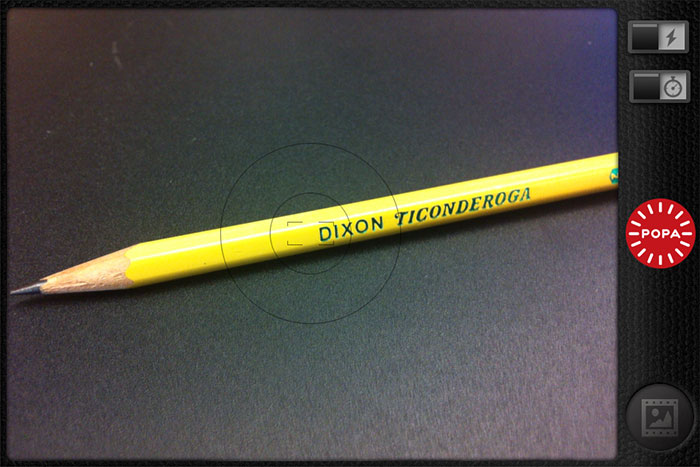
The classic camera aesthetic of the POPA are carried into the app with some lovely design touches. I love that the app says it’s ‘developing’ your photos when moving to a full screen view, and the sharing dial looks and sounds like a control dial from an old SLR – lovely.
The POPA app stores your photos on its own film roll from where you can save to the iPhone film roll, send images to other photo apps or share you shots via social networks. When you select multiple images they are highlighted as if circled by a white chinagraph pencil as if you are your very own Magnum film editor.

When moving through your images in full screen I found it odd that when deleting an image your are dropped back to the latest image in the film roll rather than moving to the next image in full screen view. If you have a lot of images in your film roll it can be a bit of pain to find yourself back at the other end of the roll.
I had some issues saving multiple images to the iPhone film roll; Beep are aware of this issue and will be fixing in an update soon.
Whilst the app has a few niggles it’s great to see how quickly Beep are rolling out updates with both bug fixes and new features. The latest update will allow saving directly to the iPhone film roll, and Beep recently shared a sneak peek of some filters and effects that are coming to the app soon – I can’t wait to play with them
The app is great app for taking fuss free images quickly with or without a POPA.
The Hardware
POPA has attracted a lot of attention since its launch on Kickstarter, where it was fully funded very quickly, and quite rightly as it is a lovely piece of design and engineering.
 The POPA’s body is cast from metal and covered with a real leather grip just like my first film SLRs. The shape of the POPA is perfect and when attached to your iPhone forms a great hand grip with the big red shutter button on top which is in just the right place for your finger.
To attach the POPA to your iPhone you need to rotate the inset base to open a door exposing the iPhone connector. This is the only part of the POPA design I’m not keen on. Having large fingers I find it difficult to get a grip on the base which is also rather stiff to rotate. If I was being very fussy, and I am it’s my nature, I feel the plastic used for the door does not match the quality of the other materials used in the construction of POPA.
Once the door is open the POPA simply pushes onto the base of your iPhone. There is some resistance when pushing the POPA on but it’s this resistance that then keeps it securely attached to your iPhone. I was a little worried about having my fragile iPhone hanging from the POPA, but it is incredibly secure once attached – I have no concerns about carrying my iPhone by the POPA alone.
The POPA is such a nicely made object I often find myself just playing with it when it’s not attached to my iPhone. Chatting with Brendan Dawes of Beep about the POPA he said:
I always wanted to make POPA a thing by itself – not something that looked like it was missing another bit, or was even an accessory to something else.
I think he succeeded.
The Whole
The app really comes into its own when connected to the POPA; where the app will work without the button the button will not work without the app.
Connecting your POPA automatically opens the app, and you are ready to shoot straight away.
I once had an issue with the app not recognising my POPA and not firing when the shutter button was pressed, but restarting my iPhone solved it, and I know that Beep are working to fix this.
The attention to detail and quality of POPA extends to its packaging which is a delight and the inclusion of a drawstring pouch for your POPA and a real leather wrist strap that attaches to the tripod bush on the bottom of the POPA.
The app is a great iPhone photography app, and the POPA is a lovely piece of design and engineering which combined transform your iPhone into an easy to hold and easy to use camera. POPA brings back the speed to iPhone photography and adds a new level of comfort and utility with the addition of a handgrip and big red shutter button. If you like photography and use an iPhone then a POPA will enhance both.
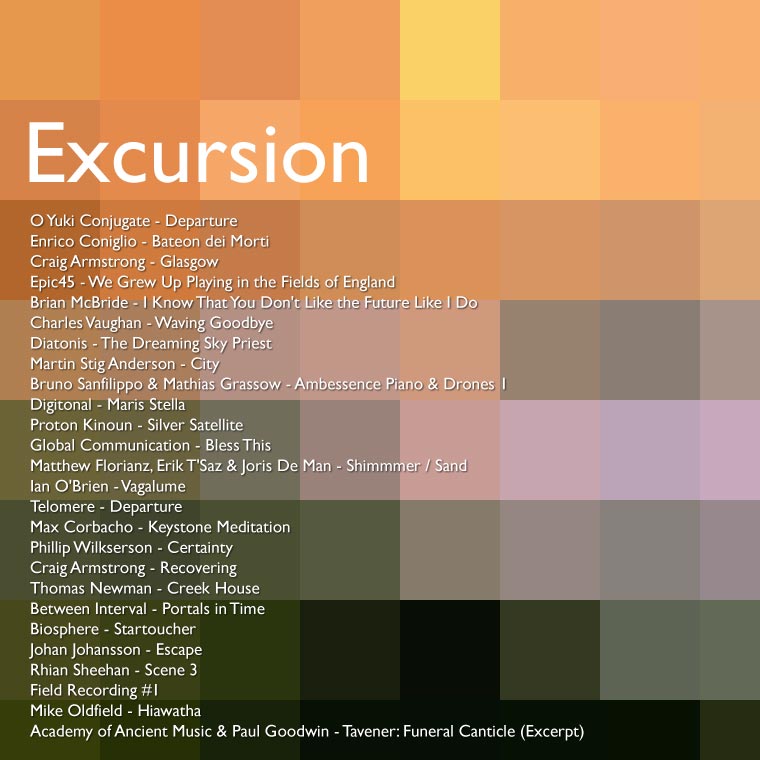
Excursion is a new mix from Excursion Radio, AKA Michael McGarrity, which follows on perfectly from his earlier mixes Home and Home Two.
I’d describe this mix as darkly ambient, but with a lighter feeling towards the end like the sun rising after the night. This feeling inspired my latest ‘homebrew’ cover art which you can download below.